Contents
What is a proxy?
A middleman that talks to the site for you: the site sees its address, not yours. What that changes, and what it does not.
update Updated
The principle, in one picture
When you open a website, your computer connects to it directly. The site therefore receives your IP address, the number your internet provider assigns to your connection. A proxy steps in between: you talk to it, it talks to the site, and it hands the answer back to you.
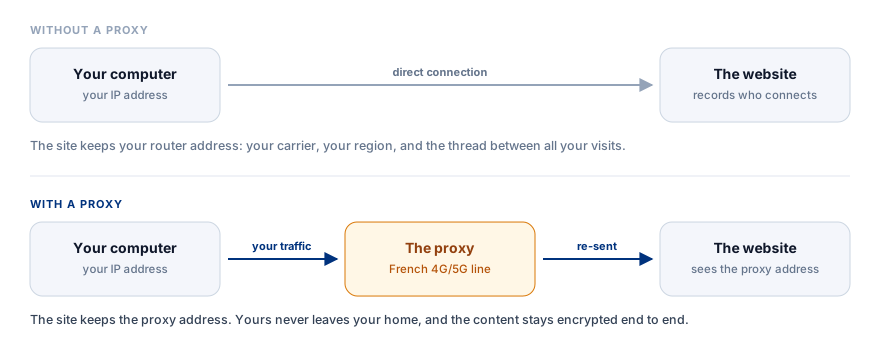
Nothing else changes. You browse normally, to the same addresses, with the same browser. Only the address that shows up on the other end is different.
What your IP address says about you
An IP is not a name, but it says a lot, and above all it links things together:
- A carrier and a region. Any website knows, in one request, that you are with a given provider, in a given country, often in a given large city.
- A type of connection. Home router, corporate network, server rented from a host, 4G/5G mobile line: these categories are public, and platforms do not treat them the same way.
- A common thread. Two accounts, two sessions, two visits three months apart from the same address can be tied together. It is often the only thing linking them, and it is enough.
What a proxy does, and does not do
It does: present a different address to the site you visit, and keep apart contexts that should not cross.
It does not:
- It does not make you anonymous. The service hosting the proxy knows who you are. That is exactly why you pick a provider you trust rather than a free public proxy.
- It does not encrypt your traffic. What protects the content of your exchanges is the visited site's HTTPS, not the proxy. With us, that encryption is never opened along the way: your browser negotiates directly with the target site.
- It does not change your software fingerprint. Screen resolution, installed fonts, language, timezone, graphics card: the browser still hands all of it over. Two accounts behind two different proxies can still be matched through those parameters (see Compartmentalizing what you do).
- It hides nothing from your local access provider. Your router or carrier sees that you are sending traffic to the proxy, even if it cannot see the decrypted content.
Proxy, VPN, Tor: each tool has its use
Each solution answers a precise network need. There is no perfect tool in the absolute, there are tools suited to given situations.
| Tool | What it covers | What it is made for |
|---|---|---|
| Proxy | The configured application | Targeting one specific piece of software (browser, script, antidetect profile), running multiple accounts, automating |
| VPN | The whole device | Encrypting all system traffic, securing public Wi-Fi, changing the route of the entire machine |
| Tor | The Tor browser | Resisting state censorship and seeking maximum anonymity through a triple relay |
- A VPN is ideal for overall security. It wraps the whole operating system in an encrypted tunnel. It is the perfect tool when you work on the Wi-Fi of a hotel, a station or a café, or when you want every piece of software (messaging, games, the system itself) to exit through a remote server in one click. On the other hand, it applies to the whole machine at once: you cannot simply split five distinct work profiles across five different addresses in parallel with a classic VPN.
- A proxy is the made-to-measure tool. It is set application by application. You can leave your personal mail on your home line, launch a work profile on a 4G/5G mobile proxy, and run a Python script on another port. It is the standard for fine compartmentalization and multi-account management.
- Tor is built for activist anonymity. Its architecture routes your packets through three successive encrypted nodes. It is formidable against targeted surveillance, but it is very slow, unsuited to heavy transfers, and Tor exit addresses are catalogued and then blocked by most consumer platforms.
Not all proxies are equal
What sets them apart is not the transmission technique, it is where the IP address comes from:
- Datacenter: an address rented from a host (OVH, AWS, Hetzner). Fast and cheap, but immediately identifiable. Those ranges are public and demanding services filter them by default.
- Residential: the address of a fixed home internet line. Plausible on a fixed network, but often shared between several unknown users through bandwidth-resale networks.
- Mobile: the address of a real SIM card connected to a carrier's 4G or 5G network. Thousands of legitimate subscribers share the same public IP at the same moment through the CGNAT mechanism, which makes those addresses particularly well accepted by platforms (see What is a mobile proxy?).
FRProxy provides French 4G and 5G mobile exclusively: a physical SIM card, dedicated radio equipment, a clean carrier line.
What it is actually used for
- Separating a professional activity from a private life on the same computer, so that your personal searches and your business accounts are not associated by ad networks or platforms.
- Running several independent profiles, for example several e-commerce shops or social media accounts, without creating a network link between them.
- Seeing the web as a local user does, watching prices, product availability, search results or listings exactly as they appear to a mobile user in France.
- Running technical tools, such as test scripts, monitoring tools or public data collection, without using the fixed IP address of your office or your home.
How do you use one?
A proxy needs no heavy installation. It always comes down to four values: a host, a port, a username and a password.
You copy those into the software of your choice, depending on how you work:
- In an antidetect browser (AdsPower, Dolphin{anty}, BitBrowser, Geeklark) to assign a unique proxy to each isolated browsing profile.
- In a browser extension (such as FoxyProxy) to route web requests with your credentials, without changing the connection of the rest of the machine.
- In your scripts or command lines (
curl, Python, Node.js) by passing the credentials directly in the network options or the environment variables. - At the level of the whole system: the old way is Proxifier, which still works to intercept application traffic and route it to your SOCKS5 port. The modern way is to use your proxy over WireGuard: you load your profile on the computer or the phone, and the device's entire traffic goes through your 4G/5G mobile line, with the convenience of a VPN.
Every FRProxy proxy provides an HTTP port, a SOCKS5 port (same credentials, same exit IP) and a rotation link to change IP on demand, all at once. The protocols are explained in detail in HTTP or SOCKS5.
See also: Why a French mobile IP changes everything · Compartmentalizing what you do · Checking that your proxy works
Need a French mobile proxy? A real French 4G/5G line, one HTTP port and one SOCKS5 port, IP rotation on demand.
See the offersarrow_forward